MIND CSS Guidelines v.1 (work in progress)
General Thoughts
Many of the ideas outlined here are inspired from Johnathan Snook's "SMACSS": "Scalable and Modular Architecture for CSS".
TL:DR
SMACSS is a general philosophy (no "hard and fast" rules) on getting better organized with CSS, and having your styles be as modular as re-usable as possible.
If done correctly the end result is CSS that is cleaner, easier to maintain, easier to understand.
WHY!?!?
Some of these ideas regarding "CSS architecture" are now mature and well-thought out enough to start using on projects large and small.
This document will change as we figure things out.
Further Reading
- Think Modularly
- About HTML semantics and front-end architecture
- All about the SMACSS philosophy
- Confused? SMACSS and BEM advice from other developers who were also confused
- Side effects in CSS
We will organize our styles into 3 basic categories:
Base
- "Defining the default styling for how that element should look in all occurrences on the page."
- "Base styles include setting heading sizes, default link styles, default font styles, and body backgrounds."
- Other general styles, like css resets will live in the BASE folder.
Layout
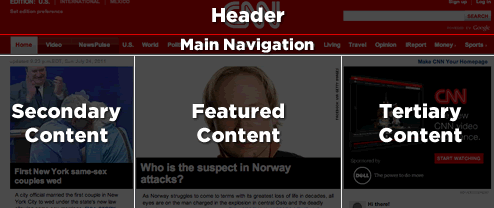
Here you specify all types of layout containers, such as header, footer, content, sidebar, etc. The layout elements divide the website into major sections.
Modules
"Module is a more discrete component of the page. It is your navigation bars and your carousels and your dialogs and your widgets and so on. This is the meat of the page.
Modules sit inside Layout components. Modules can sometimes sit within other Modules, too. Each Module should be designed to exist as a standalone component. In doing so, the page will be more flexible. If done right, modules can easily be moved to different parts of the layout without breaking."
"Break something into a module only if it would be useful in another context. Everything else remains an element or component inside a module."
"Pages" or "Views" (optional?)
Page-specific styles can live here if we decide to create a separate "Pages" folder. This may not be necessary.
Further Reading
Naming things
Tying it all together with the BEM Naming convention
"The point of BEM is to tell other developers more about what a piece of markup is doing from its name alone."
BEM stands for "Block, Element, Modifier"
- Block: The sole root of the component.
- Element: A component part of the Block.
- Modifier: A variant or extension of the Block.
.site-search {} /* Block */

.site-search__field {} /* Element */

.site-search--full {} /* Modifier */
That said, we don't necessarily have to use double-underscore and double-hyphen for naming. The double-underscore and double-hyphen make it easy to clearly distinguish and Element and a Modifier, but we can come up with another way to show those distinctions, like using "camel case" to name a block, and single underscore or dash to name Elements and Modifiers, respectively:
.siteSearch {} /* Block */

.siteSearch_field {} /* Element */

.siteSearch-full {} /* Modifier */
These class names may look ugly, but they are easy to read and understand.
It's also worth noting that you don't have to add classes to every single thing
The point is, it's worthwhile to come up with a convention and stick with it; the more the company grows, the more important this will be.
Further Reading
It's OK to chain classes together, as long as you don't go overboard
<a class="btn btn--submit" href="http://somewhere.com">Link</a>
The "btn" class provides a baseline level of styling, the "btn--submit" modifier class adds a bit more.
That said, a good rule of thumb is: "Avoid adding more than one modifier to an element".
/* Probably not a good idea*/

<a class="btn btn--submit btn--large-text btn--border" href="http://somewhere.com">Link</a>
Just create a new class, like "btn--awesome".